Showing posts with label learning. Show all posts

Sketchnotes .... Inspired ....

Sketchnotes .... Inspired ....

I attend tons of educational conferences throughout the year.  Some I am there just as an attendee to learn from others while other conferences I am there as a presenter sharing my EdTech skills and insight.  While I was in the Tampa area last year I met this pretty spunky red head who is very talented in sketchnoting.  If you do not know what sketchnoting is it is a method of making your notes visual and tying emotion to your notes.  Sketchnotes include a mix of images, words, and color. When you refer back to your sketchnote you remember more why you thought that point, fact, and etc.... was so important.  This amazing talented teacher that I met in the Tampa area at ST4T in 2015 inspired me to let go of my standard you write neatly on the line from left to right and to think outside of the box.

If you could take a peek into my mind you would see I truly do not think inside the box.  I have thoughts floating in bubbles, while others bounce off the walls, and still others hiding in the dark.  I think that sketchnoting will be a way to let my thoughts and ideas out.  Keep in mind I am no artist.  I can not draw a straight line even if I had a ruler.  Even though I am not talented in the art, drawing, and doodling world I am going to do my best to get my thoughts out of my head and make them a reality.

Thanks Amber for being an inspiration.
 

Ideas on How to Incorporate Augmented Reality in Your Classroom...

Ideas on How to Incorporate Augmented Reality in Your Classroom...

Augmented reality is quickly becoming recognized as an engage tool to use in the classroom. However, as we often see with new ed tech, it’s not just a matter of having the tools available and knowing how to work the devices involved. It’s about knowing how a this tool can actually enrich the learning experience, and where, when and how to include it.

Feel free to reach out to me if you need help incorporating augmented reality in your lessons.  You can contact me via Twitter - @katieann_76 or my website - www.katieannwilson.com.


Augmented reality can be used to:

  • Include audio or video description of printed instructions, for learners who process better when something is read aloud or demonstrated visually.  Some kids just do better if they see or hear the instructions.
  • Use augmented activities for differentiated instruction, reinforcement, & or enhancement. 
  • Link lessons to 3D models or 360 environments of real places being read about in basic text or stories.
  • Present 3D models or images of artwork in visual art class.  Bring the Smithsonian Institution, the Le Louvre, or even the Acropolis Museum to your students.
  • Work in audio and or video clips of music on worksheets in a music class or to help kids learn a play.
  • Provide hints, tips for quizzes or a interactive review before a quiz.
  • Send home video or pictures of student presentations in class or school newsletters.
  • Bring science lessons to life with 3D models of chemical bonds, cell structure, or planetary orbits.  Let the kids hold the universe in their hands.
  • Bring history to life with 3D models or video clips about important buildings and landmarks or even a 360 environment.  Let kids walk around inside a pyramid.
  • Send surprise messages or encouragement to students to remind them that they matter. Each student could have their own AR trigger and the content can be changed to customize verbal or video feedback.

Join the Augmented Reality for Education community.  With in the community you can find augmented lessons, resources, and even ask for help.  We also have a weekly Google Hangout every Wed. at 7pm central where you can join in, ask questions, and get ideas.  On the 2nd & 4th Thur. of every month we have a Twitter Chat #AR4Learning where you can join in on the conversation. 


WHY USE AR CHALLENGES .... THE SERIES .... PART 3

WHY USE AR CHALLENGES .... THE SERIES .... PART 3


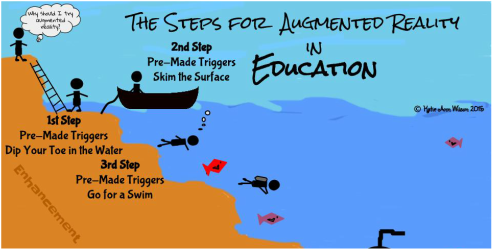
Pre-made augmented triggers can take learning deeper. We are going to go a little beyond skimming the surface with some already made augmented triggers. For step 3 of the series we will be looking into how pre-made triggers that are connected to an animated lesson, a 3D model, a video, or a 360° environment can take the learning experience to the next level.

Making an Interactive Notebook, Binder, or Journal:

I know several teachers that like for students to take notes, write in a journal, or keep a running binder of resources. Why not add an enhancement to the student's journal, notebook, or binder and reinforce a concept, topic, or enhance the learning with an augmented trigger. Someone else has already done the work of creating the augmented trigger all you have to do is match it the topic, concept, or lesson. That someone being the team of Aug That. They have tons of animated lessons from 1st grade through 8th grade on both English/Language Arts and Math, which by the way they have aligned to the common core standards. They also have massive library of 3 dimensional objects and 360° environments.

Studying space and different rockets why not put a augmented trigger of the rockets you are studying in your students' notebook. When they scan the trigger the 3 dimensional rocket pops out of their notebook where they can spin it around and zoom in on the rocket for a better look. You can't really get that experience just looking at a picture.

You have a few students having trouble with retailing a story. On their journal page adhere an augmented trigger that is tied an animated lesson that reinforces how to retail a story. A student needing a little help with developing a supporting topic, print out the already made augmented trigger and have the student attach it to his or her notes, journal, or added it to the resource binder. What if a student was gone and missed how you explained how to added and subtract decimals. Stick an augmented trigger on the assignment or, in the notebook, or send home a flashcard with the trigger on it.

Studying different historical sights such as the pyramids in Egypt. Why not have the students add an augmented trigger to their notes. When they scan it a 3D model of the pyramids pops out. Want to take them to see a volcano, summit for a mount range, or an ocean reef? Add an augmented 360° trigger to your students' writing, notes, or resources. When they scan the trigger it will transform your classroom into that environment.

Example of an Interactive Math Notebook:

I've been working on a 7th grade Interactive Math Notebook for a teacher friend. This notebook is basically a spiral notebook kids are writing notes, adding foldables, and other resources that pertain to 7th grade math. The teacher gave me the notes the kids are writing along with foldables she has created. My job was to go through Aug That's library and match up the math concept with the already created augmented triggers such as adding and subtracting decimals, fractions, and etc...

Once I found the augmented trigger that went with a certain math concept I copied and pasted the trigger image on to the foldable. If there was not a foldable just notes I then created a sheet full of that the trigger I wanted to use. The kids then cut and pasted the trigger next to their notes. Below is the link to one of the math foldables I added a pre-made augmented trigger to.

The Challenge:

You will have to contact Aug That's support team for this challenge. Ask them to show you an augmented animated lesson, 3D object and a 360° environment. Let them know what grade level and subjects you are working with. Don't forget to let them know I sent you.


Once you have tried all three different pre-made triggers I want to share your experience. You can choose how you want to share it. For example you could write a blog post, Tweet out your experience, share it with a friend, or even join my Augmented Reality for Education Group and let us know about your experience. Remember when sharing via social media use the hashtag #TechieEdu.


Resources:


Transforming Education .....

Transforming Education .....

Augmented reality in a STEM curriculum will transform how students learn. STEM stands for science, technology, engineering, and mathematics.  The approach of STEM is to teach these disciplines as a whole to be applied in real life applications instead as separate entities.  When you add augmented reality or better known as AR into the mix as a tool you literally open your classroom to endless possibilities.  Augmented reality in education is on the forefront of transforming how we teach and learn.


AR can transport you into environments from around the world, bring 3 dimensional objects to life, and best of all AR will transform how you see and interact with the world.  To make AR work you need a trigger, or trigger image.  The augmented reality app looks for defined lines and contrast, kind of like a QR code.  When the design has been recognized by the app it triggers the augmented experience, thus calling it an AR trigger.

Corporate business have seen the power of using augmented triggers in their marketing campaigns. According to Digi-Capital the impact of augmented reality is on the forefront and has forecasts that by 2020 augmented reality will be a $120 billion industry.  An example of augmented reality being used could be a lumber yard or a truss company using an app called Sapphire Viewer by MiTek that allows you to interact with a virtual 3 dimensional building.  You scan the blueprint of the building and can literally measure the support beams, inner walls, and even see all the way down to the studs.  What a powerful tool for teaching math, design, and architecture.  IKEA has an app that provides augmented reality to give a virtual preview for a room design.  Using this app can help with teaching math concepts such as dimensions and perimeter, as well as design and economics.   

Companies see the endless possibilities, and the powerfully impact augmented reality can have in education which is why in the next four years we will see a huge growth in incorporating AR into the classroom.  Companies have started making mind blowing triggers, so when scanned with their app you receive a superimposed computer generated experience or a virtual world.  The only problem I can see is that they have not yet successfully implemented a curriculum.  It feels like they have gotten the cart before the horse.  They have the tools but are lacking the educational content.

Augmented reality is a powerful learning tool that we need to start using in our classrooms especially in our STEM and STEAM classrooms.  The CEO Adam Newman of Aug That has seen the impact augmented reality has in education and has developed not only a platform for augmented reality but a community for educators called Teach Connect.  With Aug That you have access to pre-made animated lessons to reinforce concepts being taught in the classroom, as well as to 3 dimensional objects, and powerful 360° environments.  Students can literally hold the world in their hands or design their own worlds. With Teach Connect teachers and students can share their augmented lessons, 3D objects and 360° environments.  You do not need to be a computer guru to have personal augmented lessons.  You just send your trigger image and content to the Teach Connect people of Aug That and they will put it all together for you.  As this company grows so will their educational content and curriculum as well as their Teach Connect community.

An example of a STEM / STEAM lesson that involves augmented reality could be an animal adaptation project.  Teachers set the stage for this project by having students scan a 360° environment which will immerse them into the environment, then the students research the animals that could possibly live in that environment.  Students will then analyze the ways animals adapt to their habitats in order to survive, catch food more effectively, care for their offspring, and keep safe from their predators.  Once the research is completed students will design their own animal using 3D software such as Tinkercad.  They then could build a diorama to scale of the habitat including augmented triggers.  One of the triggers could be a 360° environment of the habitat and of the animal that the student based their creations from.  While another trigger would be the 3D model of the animal the student created.  Yet another trigger could be an interactive presentation or even a video of the student explaining the animal, the habitat and the adaptations the animal had to go through in order to survive in this habitat.  

When the creation of the Animal Adaptation project is completed you then could have students interacting and comparing the different environments and animals.  
Discussion questions could be along the lines of:
  • How long it would take to make these adaptations?
  • What needs to happen to the animal in order to make these adaptations?
  • What kind of food chain was there in this habitat? and etc…
All of this started with beginning emerged in an 360° augmented reality environment.

I foresee augmented reality being a tool used in classrooms such as paper, pencil, a ruler, or even an iPad.  Over 25 years ago the so called educational experts said computer technology was just a fad, now look at how far we have come.  The first computers were the size of gymnasiums and were only found at universities.  Now our cell phones have more memory and processing speed than the experts could even imagine 25 years ago.  We are teaching, training, and preparing our students for jobs that haven’t been invented yet, so why not use the tools they will be using to prepare them for their future?  We need to teach science, technology, engineering, mathematics, art, and reading as a whole not separate entities, while using tools such as augmented reality to give our students a meaningful learning experience.  There is no limit to a child’s imagination, so lets give them wings, foster their growth as they zoom into the future with the help of augmented reality.     


Eagle's View .... Augmented Eagle Nests

Eagle's View .... Augmented Eagle Nests


My daughter's kindergarten class is currently hatching chicks. She had sweet talked her dad and grandpa into buying chicks so she can watch them grow up on the family farm. Her little project got me thinking about having a birds eye view of a nest and how I could incorporate augmented reality.

When we go on vacation we try to make it educational for the entire family, we visit national parks, museums and etc...  A few years ago we went to Yellow Stone National Park, and I just happened to be at the right place at the right time and snapped this picture of a Bald Eagle. Thinking about my daughter and her love to watch baby animals, I thought how cool would it be to peek into a Bald Eagle's nest via an augmented trigger.  A augmented trigger would be easier for younger kids to use and peek into a next rather trying to look up a web address.

My plan was to embed a live web cam as the augmented element.  To my surprise the Aug That team embedded several live web cams, so my daughter and her class can see into multiple eagles nest.  When you use Aug That's "Supreme Tutoring Augmented Reality” (STAR) app and scan different areas of the image you will get a different live web cam of an eagle's nest to look at.

The App you will need to use for this project is Aug That's "Supreme Tutoring Augmented Reality”(STAR).  The app is available in both the Apple App store and the Google Play store.  Aug That is developing a teacher community called Teach Connect where teachers can share their augmented lessons they have created in a safe secure environment. There is no channel to follow, no password to enter, and no other content will appear on your augmented triggers when using their platform.  What teachers like about this community other than we can share content and it is safe, is they don't have to build it.  All they have to do is send the trigger image they want to use along with the AR element and the team at Aug That will put it together for you.  The team does approve all trigger images and content, so that you know that everything in the community is safe for kids and is educational.  This does take some time for the team to go through all the requests, so give them a day or two.


How to Bring the Above Image Alive:


  • Download the Supreme Tutoring Augmented Reality. Pick the app store you need.
  • Launch the app.  Click "Start Lesson"
  • Click "Teach Connect"
  • Scan part of the image. (The corner area.)
  • Scan another part of the image. (repeat)
  • Scan the entire image.

Resources:


Kid's On Strike - Augmented Jigsaw Puzzle

Kid's On Strike - Augmented Jigsaw Puzzle

A 6th grade Language Arts teacher friend of mine is teaching a literacy unit on the book "Kids' On Strike", by Susan Campbell Bartoletti. She is using the lesson plan from Building America and asked me if there was any way I could incorporate augmented reality (a.k.a. AR) into the lesson.  My answer was of course I can do that. I studied the lesson plan, read the book, and then dove right into how could I incorporate augmented reality into this topic.

Knowing my teacher friend was wanting to do a Jigsaw approach to this unit I decided that was the approach I needed to use to incorporate AR into the unit.  The book has 8 chapters that talk about the different types of strikes that had happened in the late 1800's and early 1900's. I found an image to represent each chapter.  Each image was then divided into 4th's.  The idea is for each member of the small group that is learning about a certain chapter would get a piece of the image.  When each piece is scanned an augmented element would appear.  When all the pieces are put together a 5th augmented element would appear.  Giving the experience a jigsaw feel.

The goal of the project is for each small group to be responsible for learning the content of the chapter assigned to them and to share what they have learned with their base group, learning the pieces to make the whole approach.  Within the small group each person is responsible to become the expert of the content that is embedded in their piece of their photo.  Above is one of the images that was used for this project.  If you print and cut the image into 4th's you will experience the augmented elements I have embedded into the image, or you just scan parts of the image.  One of the augmented elements is to take you to a Padlet board I created for this project.  Each image has it's own Padlet board.  This board will be where the students hold their discussions and to share what they have learned about that certain chapter.  

The App you will need to use for this project is Aug That's "Supreme Tutoring Augmented Reality” (STAR).  The app is available in both the Apple App store and the Google Play store.  Aug That is developing a teacher community called Teach Connect where teachers can share their augmented lessons they have created in a safe secure environment. There is no channel to follow, no password to enter, and no other content will appear on your augmented triggers when using their platform.  What teachers like about this community other than we can share content and it is safe, is they don't have to build it.  All they have to do is send the trigger image they want to use along with the AR element and the team at Aug That will put it together for you.  The team does approve all trigger images and content, so that you know that everything in the community is safe for kids and is educational.  This does take some time for the team to go through all the requests, so give them a day or two.

How to Bring the Above Image Alive:


  • Download the Supreme Tutoring Augmented Reality. Pick the app store you need.
  • Launch the app.  Click "Start Lesson"
  • Click "Teach Connect"
  • Scan part of the image. (The corner area.)
  • Scan another part of the image. (repeat)
  • Scan the entire image.

Resources:


Why Use AR....the Challenges

Why Use AR....the Challenges

Teaching others how to incorporate augmented reality into education is a passion of mine.  I love how diverse augmented reality can be.  I have also seen how engaging and powerful it can be when used as a learning tool.  I don't want to just learn about the solar system, I want to hold it in my hands! I want to dig deep into it and find out how it ticks. I want to explore every corner, turn it inside out, and flip it around. Augmented reality gives me the tools to do just that.
I don't want to just read about something, I want to learn about it.   
I've been asked to help others in dipping their toes so to speak into the water and start exploring the possibilities of augmented reality in education.  To help build the support line in learning how to incorporate augmented reality in education I am developing a series of challenges. My goal is to launch each new challenge via my podcast as well as develop an ebook to support the learning process.  As each challenge is completed the participants will also be able to earn a badge.

You will be able to follow the challenges via: 


Are you ready to take the challenge?

Creating an Augmented Snowman....

Creating an Augmented Snowman....

3D objects are not just for a 3D printer. You can take almost any 3D file and create an augmented reality experience. To introduce my students to technology terminology I had a project printing on the high school's 3D printer.  I then took the STL file of the snowman and imported into Daqri's 4D studio along with video clips, pictures, and a link to my blog post about 3D printing and created a unique augmented reality experience. When you scan the picture of me and Olaf with Daqri's app you will experience how we built a snowman.

With Daqri's 4D studio I was able to create 3 chapters each with a different augmented reality experience.  I can even go into the studio and change the experience but added more interactive components or rearrange them.

How cool would it be if at a science fair there were trigger images that you can interact with.  You could see the student's research, video clips of them working on their projects, slide show of the projects progress, or even interview clips of the student or experts.

When it comes to students creating augmented projects the possibilities are endless.


Resources:


Ring in the New Year with EdTech & More ...

Ring in the New Year with EdTech & More ...

2015 is going to be the year of possibilities and much more.  With that thought in mind I revamped my personal website www.katieannwilson.com.  My goal is to bring all of my talents from creating interactive lessons, augmented reality, digital storytelling, to a trainer, presenter, and speaker all in one place.  I've even included a resource section were I've placed interactive activities, printable activities, even web & app tools I use.  I love to create and I love to show others how to create even more.  I would love to come to your school and help you bring learning to life.

2015 will also be a year for new ways for me to share EdTech with fellow educators.  I will be hosting an EdTech podcast this year.  The podcast will be an informal conversations about big ideas in EdTech.  I plan on sharing EdTech and ways to incorporate it into the classroom.  There will be guests, tips, and much more so keep your eye on Remarkable Chatter for my podcast "Podcast of a Techie Chick" or "Diary of a Techie Chick - the Podcast", I can't decide on a name.  If you would like to be a guest on my podcast and talk about EdTech feel free to contact me.