Showing posts with label teaching. Show all posts

Teacher Technology Survey....

Teacher Technology Survey...

I am conducting a study to build a better understanding of how other educators use technology tools. Below is the survey. The survey is anonymous and will be used to build an understanding of how teachers use different types of technology tools to learn and teach with. Please feel free to invite or share this survey with other educators from around the world.

The purpose of this research project is to build a better understand how educators use technology to support teaching and learning. This is a research project being conducted by Katie Ann Wilson at Capella University. You are invited to participate in this research project because you are in the field of education. Your participation in this research study is voluntary. You may choose not to participate. If you decide to participate in this research survey, you may withdraw at any time. If you decide not to participate in this study or if you withdraw from participating at any time, you will not be penalized. The procedure involves filling an online survey that will take approximately 10 minutes. Your responses will be confidential and we do not collect identifying information such as your name, email address or IP address. The survey questions will be about how teachers use technology. We will do our best to keep your information confidential. All data is stored in a password protected electronic format. To help protect your confidentiality, the surveys will not contain information that will personally identify you. The results of this study will be used for scholarly purposes only and may be shared with Capella University representatives. If you have any questions about the research study, please contact Katie Ann Wilson.

ELECTRONIC CONSENT:  Clicking on the "agree" button below indicates that (located on the form):
• you have read the above information
• you voluntarily agree to participate
• you are at least 18 years of age

If you do not wish to participate in the research study, please decline participation by clicking on the "disagree" button.


  • If the survey does not appear below for you please click here to visit the live form.


~*~*~*~*~*~*~*~*~*~*~*~*~*~*~


Playing in the Sand ... AR Style ....

Playing in the Sand ... AR Style ....


I learned abut the AR sandbox almost 2 years ago and finally in May of this year I got to see it in action.  For my son's senior project he set up an AR sandbox for the high school.  The original Sandbox prototype was designed and built by project specialist Peter Gold of the UC Davis Department of Geology. The driving software is based on the Vrui VR development toolkit and the Kinect 3D video processing framework, and is available for download under the GNU General Public License.  Using this software, a Linux based computer, a short throw projector, and a Kinect 3D scanner he was able to make the AR Sandbox a reality.

My STEM students were one of the 1st group of students to tryout the AR Sandbox.  Let me tell you they fell in love instantly.  As they were busy building different land-forms my teacher mind was jumping up and down.  What a great way to visually see a topographical map.  My students that have to get all hands on deck building the different elevations would love it.  My students that are visual learners would also love seeing the elevations form.  My 1st thought was what if I gave two groups of students two different printouts of a topographical area and have them build them next to each other in the sandbox.  They then compare how they were able to build a certain elevation. They also can compare how different and or similar their two elevations are.

My mind then went to having my students build different mountain ranges and compare their elevations.  I would then have them discuss the weather on the mountain rages, the animals, and the foliage and why some mountains tops do not grow any kind of vegetation.  Talk about seeing the world from a different perspective.


Resources: 
My son demonstrating to my students
how the AR Sandbox works.

ARSandbox - Website
AR Sandbox - Educators Resources
AR Sandbox - Technical Resources
Move Mountains and Carve Rivers in a Seriously Awesome AR Sandbox - Wired Article

Join us on June 2nd 8pm central as I share how you can create your own AR sandbox among other fun augmented tools you can use with your students.


Podstock STEAMpunk Edition ........

Podstock STEAMpunk Edition ........

What is Podstock? Podstock is a small edtech conference located in the heart of Kansas.  A bunch of educators get together in the middle of July to connect, learn, and share.

This is one of my favorite conferences to attend and present at.  Everyone is so energized, excited, helpful, and caring.  Every year I walk away with my head spinning with all of the tools, tricks, tips, and ideas.  This year the tradition continues.  There are so many sessions I want to sit and can thanks to some amazing friends sharing via social media using the hashtag #podstock15.


Some Tools So Far:


Lets change how we view hands-on, problem-base, project-base, STEAM, STEM, and lets learn by creating!  Dream, Design, Build...Repeat!


AugThat's Ambassador Program....

AugThat's Ambassador Program....

I am really excited to announce that AugThat has launched an ambassador program and I get to help run it.  I love sharing and helping other educators learn and use Augmented Reality in the classroom.

Augthat Ambassadors program is a community of K-12 educators leading the industry in ed-tech. These educators are supporting, empowering, and inspiring teachers inside and outside of Augthat! They will be spreading the Augthat philosophy and immersion of augmented reality throughout their networks and partner with the Augthat team to help other educators become power users of ed-tech.

Some Expectations:
All Ambassadors are able and encouraged to:

  • Be present in the Augthat community and large teacher groups to answer questions, provide tips to new users, and share ideas for using ed-tech and and Augthat. 
  • Become a Certified Trainer and provide formal Augthat! Professional Development
  • Get early access to new features and share feedback directly with the Augthat Team
  • Flag any technical issues you come across so our engineers can investigate
  • Drive the conversation about ed-tech and Augthat through social media
Participate in the Augthat Ambassador Professional Learning Community to share learning with fellow Ambassadors and stay up-to-date about the latest happenings in Augthat and ed-tech.  Does this sound like you?  If so please apply to become an AugThat Ambassador.  Click here to fill out the application.

For more information about the program please click here.

Exciting NEWS:

All Ambassadors will have their very own button within the app to access the Augmented Content they have created.  For example if teachers have any of my triggers once in the app all they have to do is click on my name and scan away.  The AugThat Ambassadors will be like featured Augmented Content Creators.  The AR Rock Stars!  What is even more exciting Ambassadors will have early access to new AugThat's content, lessons, activities, and curriculum.  I have to tell you that there is some amazing stuff being developed, that I can't wait to try out.  You thought the 360 ° environments were mind blowing just wait.


The Sweet Sixteen to the Final Four .... Augmented Basketball

The Sweet Sixteen to the Final Four .... Augmented Basketball

During March Madness the 7th grade students were learning about ratios and percentages.  Their math teacher Miss Leiker thought it would be fun to put an engaging spin on her lesson and create an augmented basketball tournament. With a little help from me, the AR Basketball trigger, and Daqri 4D studio we developed an augmented basketball tournament.

The goal of the tournament was to apply what they had learned about ratios and percentages.  To collect their data students entered how many shots they made out of 25 onto a Google Form.  To access the Google Form students had to scan the augmented trigger for their class class and select Hoop it Up.  To view the class's tournament bracket students scanned the same augmented trigger and selected the basketballs.  Below is one of the augmented triggers. There was a augmented trigger for each class.


After students collected the data for their tournament they had to apply what they learned about ratios and percentages.  For example the percentage of shots made per person and overall, and the ratio of shots made versus shots missed.  

Example Math Problems: 

  • Write a part to part ratio based on your shooting results. Explain the meaning of your ratio.
  • Write a part to whole ratio based on your shooting results. Explain the meaning of your ratio.
  • Write three equivalent ratios based on your part to part ratio.
  • Write three equivalent ratios based on your part to whole ratio. 
  • Based on your results for make and misses, complete the table below to see how many baskets you SHOULD make or miss if you earned a 2nd round of shooting. What about a 3rd round? 4th and so on... 
  • A college basketball player last season shot 32/56 at the free throw line during the NCAA Tournament. Based on your shooting results, do you have a better shooting percentage than this player? Explain or show your work. 
  • If you were to shoot 72 baskets, based on your ratio, how many would you expect to make? Explain or show your work. 
  • How many would you expect to miss? Explain or show your work. 
  • Write a part to part ratio based on your amount made and missed for 72 shots. 
  • Is the part to part ratio from question C an equivalent ratio to your actual shooting results? Explain. 

The Tools Used:


Eagle's View .... Augmented Eagle Nests

Eagle's View .... Augmented Eagle Nests


My daughter's kindergarten class is currently hatching chicks. She had sweet talked her dad and grandpa into buying chicks so she can watch them grow up on the family farm. Her little project got me thinking about having a birds eye view of a nest and how I could incorporate augmented reality.

When we go on vacation we try to make it educational for the entire family, we visit national parks, museums and etc...  A few years ago we went to Yellow Stone National Park, and I just happened to be at the right place at the right time and snapped this picture of a Bald Eagle. Thinking about my daughter and her love to watch baby animals, I thought how cool would it be to peek into a Bald Eagle's nest via an augmented trigger.  A augmented trigger would be easier for younger kids to use and peek into a next rather trying to look up a web address.

My plan was to embed a live web cam as the augmented element.  To my surprise the Aug That team embedded several live web cams, so my daughter and her class can see into multiple eagles nest.  When you use Aug That's "Supreme Tutoring Augmented Reality” (STAR) app and scan different areas of the image you will get a different live web cam of an eagle's nest to look at.

The App you will need to use for this project is Aug That's "Supreme Tutoring Augmented Reality”(STAR).  The app is available in both the Apple App store and the Google Play store.  Aug That is developing a teacher community called Teach Connect where teachers can share their augmented lessons they have created in a safe secure environment. There is no channel to follow, no password to enter, and no other content will appear on your augmented triggers when using their platform.  What teachers like about this community other than we can share content and it is safe, is they don't have to build it.  All they have to do is send the trigger image they want to use along with the AR element and the team at Aug That will put it together for you.  The team does approve all trigger images and content, so that you know that everything in the community is safe for kids and is educational.  This does take some time for the team to go through all the requests, so give them a day or two.


How to Bring the Above Image Alive:


  • Download the Supreme Tutoring Augmented Reality. Pick the app store you need.
  • Launch the app.  Click "Start Lesson"
  • Click "Teach Connect"
  • Scan part of the image. (The corner area.)
  • Scan another part of the image. (repeat)
  • Scan the entire image.

Resources:


Kid's On Strike - Augmented Jigsaw Puzzle

Kid's On Strike - Augmented Jigsaw Puzzle

A 6th grade Language Arts teacher friend of mine is teaching a literacy unit on the book "Kids' On Strike", by Susan Campbell Bartoletti. She is using the lesson plan from Building America and asked me if there was any way I could incorporate augmented reality (a.k.a. AR) into the lesson.  My answer was of course I can do that. I studied the lesson plan, read the book, and then dove right into how could I incorporate augmented reality into this topic.

Knowing my teacher friend was wanting to do a Jigsaw approach to this unit I decided that was the approach I needed to use to incorporate AR into the unit.  The book has 8 chapters that talk about the different types of strikes that had happened in the late 1800's and early 1900's. I found an image to represent each chapter.  Each image was then divided into 4th's.  The idea is for each member of the small group that is learning about a certain chapter would get a piece of the image.  When each piece is scanned an augmented element would appear.  When all the pieces are put together a 5th augmented element would appear.  Giving the experience a jigsaw feel.

The goal of the project is for each small group to be responsible for learning the content of the chapter assigned to them and to share what they have learned with their base group, learning the pieces to make the whole approach.  Within the small group each person is responsible to become the expert of the content that is embedded in their piece of their photo.  Above is one of the images that was used for this project.  If you print and cut the image into 4th's you will experience the augmented elements I have embedded into the image, or you just scan parts of the image.  One of the augmented elements is to take you to a Padlet board I created for this project.  Each image has it's own Padlet board.  This board will be where the students hold their discussions and to share what they have learned about that certain chapter.  

The App you will need to use for this project is Aug That's "Supreme Tutoring Augmented Reality” (STAR).  The app is available in both the Apple App store and the Google Play store.  Aug That is developing a teacher community called Teach Connect where teachers can share their augmented lessons they have created in a safe secure environment. There is no channel to follow, no password to enter, and no other content will appear on your augmented triggers when using their platform.  What teachers like about this community other than we can share content and it is safe, is they don't have to build it.  All they have to do is send the trigger image they want to use along with the AR element and the team at Aug That will put it together for you.  The team does approve all trigger images and content, so that you know that everything in the community is safe for kids and is educational.  This does take some time for the team to go through all the requests, so give them a day or two.

How to Bring the Above Image Alive:


  • Download the Supreme Tutoring Augmented Reality. Pick the app store you need.
  • Launch the app.  Click "Start Lesson"
  • Click "Teach Connect"
  • Scan part of the image. (The corner area.)
  • Scan another part of the image. (repeat)
  • Scan the entire image.

Resources:


Bringing Learning to Life with Augmented Reality....

Bringing Learning to Life with Augmented Reality....

Augmented reality is one of my passions.  I love watching kids come alive and fully engaged when they interact with augmented triggers. Students are not the only ones that come alive when they interact with augmented triggers, teachers love them too

Augmented reality is experience that super imposes computer-generated experience over a trigger image. There are several different types of augmented experiences you can interact with. These computer-generated experiences allows you to listen to music, watch video clips, interact with 3D models, or place you in an environment such as the ocean. All of these possible interactions require the student to scan a trigger image that will trigger the experience.  Thus the trigger image or target image.

Augmented Reality - IN THE CLASSROOM

Augmented Reality is an engaging tool for students and teachers, really anyone that uses it. It allows you to immerse yourself into any environment, and apply critical thinking skills to real-world scenarios.  My goal is to teach 21 century learners think outside the box and beyond their learning environments. You can take an image and create an engaging learning experience that cannot be achieved in typical two-dimensional planes, such as worksheets or on a whiteboard/chalkboard.

Because I am so passionate about augmented reality and the impact it can have in the classroom I've teamed up with Aug That.  I am creating some one of a kind augmented lessons that you can have access to and use in your classroom, on top of their ever growing interactive lessons, 3D objects, and 360° environments. Aug That is also giving free access to Teach Connect all you have to do is tell them that the Techie Chick sent you.

Teach Connect allows you to create augmented triggers in a safe environment. No channels to follow, no scanning and getting something inappropriate, a totally complete safe environment. You don't even need to know how to create the augmented experience all you have to do is send them the trigger image you want to use and what you want the experience to be. You also get access to other teacher created augmented lessons. I can even help you create and use augmented lessons in your classroom, all you have to do is ask.

Take a Demo of Aug That.  Download the STAR app and check out their Demo page.  You are going to love it.  After you have taken the Demo email Lisa@Augthat.com and tell her that the Techie Chick sent you.  She will get you connected with your free Teach Connect account.  Once my lessons are up and running you will also get access to those.

Resources:


Take the AR Challenge - #TechieEdu.....

Take the AR Challenge - #TechieEdu.....

Augmented reality is a technology that superimposes a computer-generated image on a user's view of the real world, thus providing a composite view.  Augmented reality is a tool to engage students.  There are several pre-made augmented triggers that you can use or you can create special augmented triggers of your own.  When lessons are engaging learning takes place.


Some AR Ideas:

  • Use a Augmented Color page as a writing prompt, to enhance a writing project or to teach revision skills. 
  • Use the DOT Day color sheet and have kids design interactive LOGOS. 
  • Elements 4D has Lessons and Printable Blocks. 


History Projects On the Scene Reports Interviews with Historical Characters Audio Clips Interactive Maps.


The Challenge:

Use an augmented trigger in one of your lessons.  It could be an AR coloring sheet from colAR, Chromville, or even Color Alive. You could even use the NASR 3D trigger, Elements 4D blocks, or even Cybercase Shape Quest.
  • Take pictures of your students using the AR trigger. 
  • Post your project on the AR Project Ideas board. http://padlet.com/tigerlovessmoke/arprojects
    a. What was your project?
    b. How did you use the AR trigger?
    c. What AR experience did your trigger have? (video, music, 3D object, & etc...)
    d. Did your AR trigger have more than one AR experience?
    e. What was the reaction from your students? 
  • Share your AR experience with other educators. 
  • Tweet out your AR Project. Use the hashtag #TechieEdu

Resources:


Do You Want to Build a Snowman?

Do You Want to Build a Snowman?
It doesn't have to be a snowman...

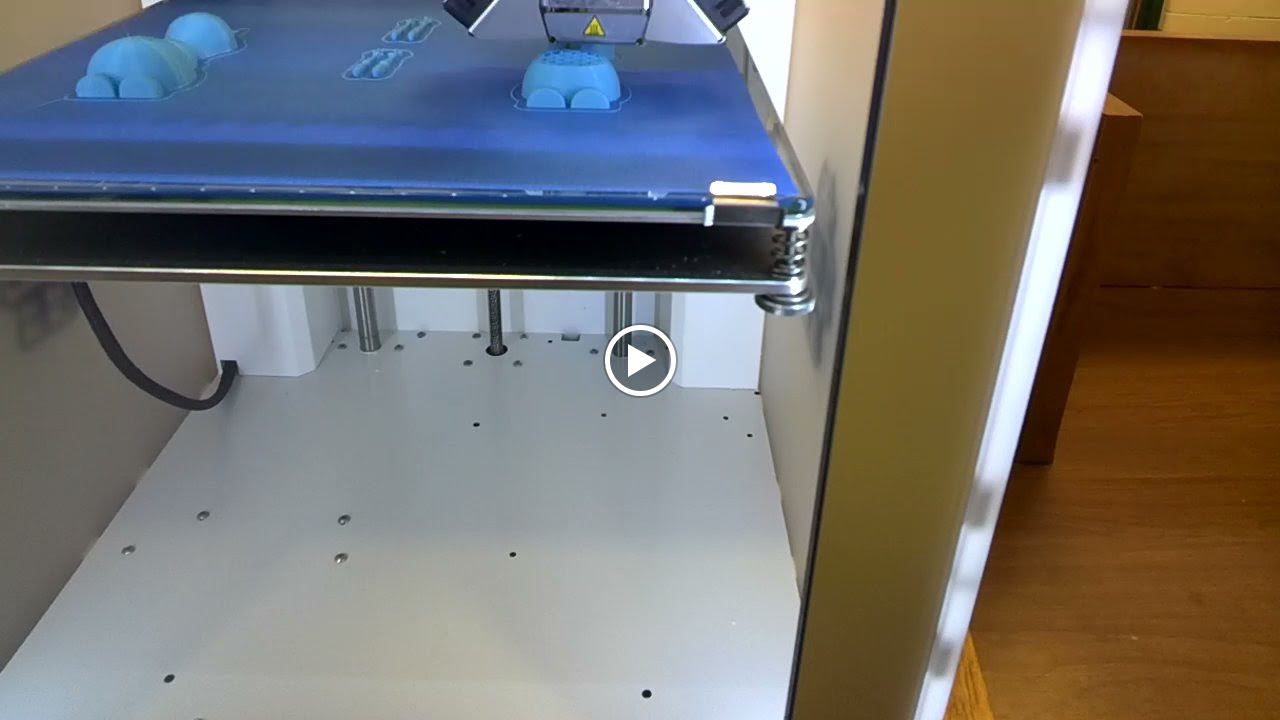
The Pratt High school received a 3D printer and the middle school was invited to use it.  If I could have I would have done a dozen cartwheels when I heard the news.  The 3D printer arrived just in time for me to introduce technology terminology to my technology students.

Knowing how much my students love Olaf I went searching for a 3D object file of him that I could use with the 3D printer.  I found one in the MakerBot Thingiverse site.  I myself am not a designer just yet so thanks to those that have shared their designs in Thingiverse I was able to demonstrate how a 3D printer works.  My students were in awe as they watched the layers build.  By the end of the day I had students who were not in my classes wanting me to take them over to the high school so that they can experience the building of Olaf.

Seen though Google Glass
After seeing the 3D printer in action my students are blogging about their experience.  They are explaining what a 3D printer is, how it works, what materials it can use, and what they would like to create with it.  During their research on 3D printing my students descovered that their are 3D printers for food, they especially like the one that will make pizzas.


Our Finished Olaf

Resources:


EduLS Week 1 Challenge .....

EduLS Week 1 Challenge .....

I participated in the summer Educator Learning Series challenges or as many as I could and I thought I would give these challenges a go.  The EduLS week 1 challenge is Lisa Dabbs challenge is asking us for this year instead of a resolution she is challenges us to #onelittleword to help guide and define our year ahead.  Todd with his Educator Learning Series has now challenged us to #onelittleword.  You are to create some kind of graphic with you and your word to remind you of the One Little Word that you picked to guide you through your year.


Resources:


App / Tool of the Week .... EduCrate

App / Tool of the Week .... EduCrate

What is EduCrate? EduCrate is a media curation tool for educators.  It is a place where you can explore, share or even create your own crate of educational videos. The best part is that the videos can come from a multiple of online video sites and you save them all in one location.  If you can copy and paste website links then you can create a crate.

What I really love about this tool is that you can tag your crate (a group of videos) with a certain common core standard, topic, grade, and even subject. When you share your crate that has a variety of tags can help educators find video clips in that area.  There are so many video clips that educators, students, and even companies are making is mind blowing. To be able to have them all in one place just makes life a little easier for busy teachers and students. 

Tips:

  • Add a description to your crates.
    • This way you will remember what type of video clips you have saved.
  • Add additional web resources to your crate.
    • If you have a game or other resources besides a video clip you can add the link to your crate and tie it to the subject/topic/skill/grade you are teaching.
  • Tag your crates.
    • If you use tags it will help you find similar video clips for that certain topic/subject/grade and etc... 
  • Add the Crate Bookmarklet to your browser.
    • This will help you save your video clips when you are surfing the world wide web.

Some Crates:

A Year in Review .... 2014

A Year in Review .... 2014

I've grown a lot personally and professional throughout 2014. My family even reached memorable milestones.  From my oldest son turning 16 and started driving himself around. To my daughter starting kindergarten while my youngest son started high school.  2014 for me is going down in my record book of a year of growth.

I started 2014 off by hopping on an airplane headed to FETC.  I was glad a had a friend traveling with me to help guide my way during such huge conference. Thanks Brenda for the guidance and the little push, without you I don't think I would be heading down my new path.  I do believe that FETC has been the largest conference I had attended in my career in education.

The hardest and most memorable journey I took was hopping on a plane to go to iPadpalooza.  I hadn't really traveled by myself before, but thankfully there was a kind face waiting for me when I landed.  Wendy opened up her home to me and watched over me while I was at iPadpalooza. Wendy you will never know how much your kindness help me get over a huge hurdle in my life.

I had the pleasure of meeting some amazing people face to face in 2014. From Adam Bellow, Kathy Schrock, Wesley Fryer, Todd Nesloney Brad Waid, Drew Minock, Kevin Honeycutt, Ginger Lewman, to the Blue Bunny gals at SimpleK12.  I even met some amazing people online which I hope some day I will be able to meet face to face such as Craig Yen, Sheryl Place, Monique Dalli, Jess McCarthy, and Terri Eichholz just to name a few.

My PLN has grown tenfold in 2014.  Without these amazing people online and in person belonging to my personal learning network I don't think I would have
grown as much as I have.  If I need help I know I can reach out to them and they are there to lend me a hand. If it wasn't for their support I don't think I could have hopped on those planes and head off to uncharted territory.

If I had to pick a theme song for 2014 it would be Unwritten by Natasha Bedingfield. I totally believe that today is where my book begins and the rest is still unwritten.  I feel that 2014 has started the first chapter of my this amazing journey I am on.  I am not sure where this journey is taking me, but I know I will learn a lot along the way.

If I had to pick a theme song for the end of 2014 and the start of 2015 I would have to go with Let it Go by Idina Menzel.  I have this passion building up and I need to learn to let it go and let others see me. I've been told that others have heard me through my blog, but now they want to see me. See what I really have to offer.  I would like to extend the walls of my classroom to reach the world.  I want to share how to bring learning to life, even if it is just one classroom at a time. I attended a Launch Me workshop and have connected with lots of people from around the world that would love to see me
achieve my dream.  With their help and support I believe that I will be able to change my theme song to This Girl is on Fire by Alicia Keys.

I can't wait to see how 2015 unfolds and where I go from here.


Website - katieannwilson.com


App / Tool of the Week ..... NextLesson

App / Tool of the Week ..... NextLesson

I teach skills such as researching, creating spreadsheets, presentations, and etc.... I sometimes find myself using the same lessons or projects to teach these skills, which get boring for me.  Like most teachers I just don't have the time to create rocking lessons for every topic I teach.  I was introduced to NextLesson during the EdmodoCon 2014.  I surfed their content and found lessons I could do with my students in a matter of seconds.  I love how the lessons/projects are broken down into stepping stones. I also love how interactive they can be.  There are already created lessons some of them are free others do cost.  You can browse by Common Core standards, grade level, and even subject.  You can even create your own lesson or project.  If you need help learning about NextLesson there is a built in tour that will walk you through the different features.


One of the lessons I used with my technology classes was called My Dream Vacation.  It is a free lesson and I was able to take it and customize it to fit my students' needs.  My students really like the topic of planning their own dream vacation.  I liked it because I could incorporate all of the skills we had learned and have my students apply them in a real world situation.  I used the Rank and Reasoning with my students to help brainstorm places to go on vacation.  The discussion piece really helped my students share their findings and ask questions such as; What can you do there? What can you see? How much is that going to cost?

The stepping stones really helped keep the my students moving forward. Once they completed a task then they could move a head.  With each task you can have student notes, teacher notes, and attachments such as a web link, images, or video clips.  The teacher resources are also very helpful especially the rubrics.

One of the things I changed about the NextLesson My Dream Vacation was I wanted my students to use any tool to create a presentation.  I gave them a list of suggested tools, most of them stuck to creating a Keynote presentation others did venture out and tried something new.  Below are just a few examples of their finished product.


NextLesson Projects/Lessons:
Just a few I found interesting and fun to try.


My Dream Vacation - NextLesson

Vimeo - My Dream Vacation


App / Tool of the Week .... Actively Learn

App / Tool of the Week .... Actively Learn 

I get the privilege of teaching 6th grade Social Studies which focuses on the Ancient Civilizations when I am not teaching technology skills to middle school students.  With common core it is my job to teach my students how to pull information out of primary and secondary sources.  I find it difficult to assess my student's comprehension as we go through the various civilizations.  I am constantly asking myself: Do they really understand the Caste System?, Do they realize what they are reading happened thousands of years ago? and etc....

I recently had a chance to test drive Actively Learn. Actively Learn is an online platform that allows the teacher to pull in reading materials either from Actively Learn's catalog, the teacher's Google Drive, online source, or even a PDF.  The teacher then can add notes, video clips, and even questions.  I found the ability to add files from my Google Drive a huge plus since most of my resources are saved to my Google Drive.  Another big plus for me was that I could connect the common core standard with the questions I am asking.  I like that I can ask question while they are reading.  This breaks up the reading and assess my students' understanding.  While they are reading about King Tut I can include a video clip about his tomb and ask questions to assess their understanding.  This type of assessment gives me a better understanding if my students are really getting and understanding what they are reading.


Since some of my content has to do with diagrams and maps I love that I could add an image/media and ask questions about that image/media.  A lot of online quizzes will not support that feature.  I really liked that I can assign proficient levels to the short answers questions.  Assessing students' knowledge is more than just a letter grade.  To have the ability to show proficiency to parents is the key.  

Another great tool Actively Learn has built-in is the dictionary.  This tool is great for my students as we wade through the various ancient civilizations.  I like it because all of my students are reading the same definition not one from Webster Online another one from Dictionary.com and etc.... Students even have the ability to take notes and highlight text.

Even though I teach Social Studies I can see all of these tools very useful for other subject areas.  Actively Learn is free and students only need one account.  Students just need the code to a join class and can belong to as many classes as needed. When students are finished with the classes they can withdraw.

The biggest perk for me since I am a heavy Edmodo user is the ability to connect Edmodo to Actively Learn.  Having the ability to use Edmodo and Google Drive with Actively Learn for me is a win.


Click HERE for more information about Actively Learn or to sign up and give it a test drive. 


Going Beyond a Simple Textbook....

Going Beyond a Simple Textbook....

Last year I created an interactive ebook for my technology classes.  I filled it with a variety of of video clips, screenshots, presentations, and resources for them to refer to.  This year I wanted to create another interactive ebook but I wanted to be able to be used cross-platform and on all devices.  I guess like always I am ahead of my time.  If I wanted to make my interactive ebook available for all devices I would have to pay a company to convert it for me and there was no promise that all of my interactive components would work.  So I went back to iBook Author and created my interactive book which can only be accessed via iBooks.

I haven't decided if I wanted to submit this book to the iTunes Store or not.  The iPads that my students use block the iTunes and App Store so it isn't possible for them to download the book from there.  I did find a alternative way around that issue.  I saved the iBook file to my classroom website and my students can download it from there. It does take a while for the book to download and if I make any changes the kids will have to download the book again.

Now I can say I am a published author and I now have 2 editions to my Computer Apps e-Textbook.

eBook:

Mrs. Wilson's Computer Apps - Bringing Learning to Life
Use Safari on your iPad to download this file. You can also download this file if you have Maverick on your Mac.  It will take a while to download.


Creating AR with the Daqri 4D Studio....

Creating AR with the Daqri 4D Studio....


Augmented reality isn't anything new, it has been around for a while now. Creating your own augmented reality on the other hand has only been available in the recent few years.  This spring Daqri released their 4D studio to the education community. Out of all of the augmented reality creators I have used this one is by far the friendliest one to use. When I talk to others about creating augmented reality I hear; "That is too techie for me.", or "I just can't wrap my head around how it works.", or "There is no way I will be able to create something like that."  Let me ask you a few questions then.
  • Can you drag and drop?
  • Can you copy and paste?
  • Can you click on a button that says upload?
  • Can you click on a Plus Sign to start a new project?
  • Can you click on a button that says Save?
  • Can you click on a button that says Publish?
If you answered yes to these questions then you can create an augmented reality trigger.

For Podstock I created a mini tutorial on how to create a augmented reality trigger. Daqri did change a few things in their studio but it will not effect how you create a trigger.  You will just notice my screenshots just look a hair different.  I had put my tutorial in a NearPod presentation so I could monitor who accessed the presentation and evaluate their knowledge about the topic.  I will post the link to that as well.  Feel free to use the Google Presentation or the NearPod one. 

Just keep in mind this is a very basic tutorial.  I plan on creating more in depth ones soon. 


Presentations/Resources:

Bringing Learning to Life....

Bringing Learning to Life....

My T-shirt that I added Augmented Reality to.
This summer I set out to teach as many people as I could about creating augmented reality or use already created triggers.  I attended an edCamp and brought augmented reality to the attendees.  I stepped out of my comfort zone and presented at edCamp Home on augmented reality as well as did a hands-on workshop at Podstock.  In reaching out to others I thought a community or group was needed to keep connected with those I've reached out to.  With that thought in mind I created 2 groups.  They are both considered a private group where I have to approve your entrance into the group.  I really love Edmodo and their platform they have created.  I like that I can share folders as well as resources to those in the group.  Edmodo also has a place where you can communicate, ask questions, post ideas and etc... I noticed after setting up the group in Edmodo that some people were not as comfortable with that form of group so I created a Google+ community.  I was able to tie my Edmodo folders to my Google+ community so that people in both groups would still have access to all of the content I am sharing.

The resources I am sharing are pre-created augmented reality triggers.  Triggers are images that when scanned with the correct app will give you a unique experience by added an augmented reality component or items.  I am also posting the apps that are needed to use these triggers.  I will also be sharing how to create your own augmented reality triggers with the help of Daqir's 4D studio. The groups are also a way for others to ask questions, get help, share ideas, and etc...

If you are an Edmodo user and would love to join the Augmented Reality group for Educators feel free to join and share.  If you would rather join the Google + Augmented Reality for Educators Community feel free to join and share too.  If you want to join both feel free to do so.

The Groups:


Click here to view my interview with Chromville.

"Bring Learning to Life one Augmented Reality Trigger at a Time"

Can You See Me Now?

Can You See Me Now?

I've been traveling for the past few weeks so I really hadn't had a chance to collect my thoughts and to reflect my experience at ISTE.  Since my school wasn't going to send me to ISTE and I didn't have a sponsor so to say to help pay I had to justify the trip.  For a small town teacher in the middle of Kansas traveling all the way to Atlanta, Georgia to a 4 day costly conference is a little pricey.  In order to justify the cost I turned it into a family vacation.  I needed up dividing my time between sessions at ISTE and with my family.  I was excited to be one of the 20,000 people who traveled to Atlanta for this amazing chance to learn and connect with other educators from around the world.  In December I had learned that my proposed workshop for ISTE was accepted.  Before ISTE got under way I was notified that my session had been canceled due to lack of people signing up for the workshop.  I was a little disappointed but still stoked that I was going to be in Atlanta for the conference.  I had not been to an ISTE conference before so I was very excited to see where this avenue was going to take me.

During my time at ISTE I noticed myself becoming very frustrated and a little disappointed.  I wasn't sure what to expect but I hadn't expected myself to be frustrated.  I knew ahead of time not to try to do everything and to mark the sessions I would like to attended, which was my plan.  What had frustrated me was the 1st few sessions I attended where focused on the technology and teaching kids and or parents how to use it.  I found myself questioning why do we need to teach them how to use the device, the technology isn't anything we haven't seen in the past decade.  I also found myself remembering the keynote from iPadpoolza and the "Hole in the Wall" experiment.  Give the kids the device let them explore it and focus on the learning.  What is the objective? What do you want the kids to learn?  What are they going to take away from this experience?

A couple of other session I attended gave me lists of apps.  Which was OK but I wanted more, not more
apps but more like why these apps.  Why should I use these apps other than they are fun and entertaining? What is their purpose, what will I learn or my students from using these apps?  I guess I would rather go a inch wide and a mile deep rather than a mile wide and inch deep.  I think I would like to have a handful of very useful meaningful apps that make me think at a higher level than 50 million apps that are just fun.

When I wasn't at a session I found quiet places to sit and think.  While I sat and thought I noticed people having trouble connecting to the network, using an app, or just normal tech issues so I would lend a hand.  A teacher from New Jersey had been watching me.  She had asked for help with her iPad even though she didn't really need it to break the ice and talk with me.  She had noticed I was a little frustrated and wanted to help.  I explained to her my frustration.  She looked at me and asked if I ever noticed the signs that are all around me.  I was very confused and asked her to explain what she meant.  She explained while she watched me helping others that she had Google me (since she saw my name on my badge) and found both my blog and my resume site.  She had scanned them both and noticed all the presentations in this year alone I had done.

She was a very straight forward person and just came out and told me what she saw.  To her I seemed like a quiet person with a lot of knowledge and experience when it comes to technology and education, I could probable fix or solve a issue with my eyes closed.  I just need someone to brake the ice, which is why she asked for help.  She went on to explain that people see great things in me which is why my proposals keep getting excepted. I just need to find the one thing that helps me stand out.  We hear you, now we need to see you; those words struck home.  She went on to explain that I need to make connections that will take me to where I want to go.  Then she ask the questions that has been asked to me several times these past two months, "Where do you want to go?". In my heart I scream I want to go everywhere, but I know that is not possible.  Where can this small town Kansas girl go?  There is no industry of any kind in my town, and differently no tech education companies.  I also have 2 kids in high school and 1 starting kindergarten, it would be hard to transplant my teenagers to another school.  If we were to relocate where would my husband work? I could say is I am not sure.  I am growing personally and professionally I just not sure where it is heading.  Her advice to me was to make connections, soon the right door and window will open.

Before she got up to head for session she looked at me with a smile and told me great things will come my way.  I thanked her for the talk, I think I really needed to hear it.  Keep your eyes open as I find away for you to start to see me know.


Don't worry I will be sharing my notes from ISTE 2014 very soon.

Become a Superhero in Your Classroom with AR....

Become a Superhero in Your Classroom with AR....

I will be presenting this year at Podstock on July 17th @ 3:30pm on How to Become a Superhero in Your Classroom with AR (Augmented Reality).  I will have tons of different kinds of Augmented Reality Triggers you can try.  Some of the triggers are for younger children while others are for the middle to high school age students.  During the session I will become your Superhero and teach you how to create our own Augmented Reality in as easy as 1, 2, 3.

Click here to see the full schedule for Podstock.