The number one question I am asked is what tools do I use with students and how do I determine if the tool is the tool my students should use. I think of digital tools and resources like shoes and just like shoes, you will use the pair that works the best for the situation you are in. For example, you do not want to wear flip-flops when you are climbing or hiking you would use the proper footwear to get the job done. It is the same with digital tools, devices, and resources. Just like shoes digital tools, devices, and resources also depends on personal choice. The tools I use may not work or fit your needs so you need to use the tools you feel comfortable with.
The other side of the coin when using digital tools, devices, and resources you need to pick ones that take you and or your students beyond. For example, if you have an interactive whiteboard a.k.a. a SMART board and you never physically touch and interact with the board you basically just replaced your projector screen with a solid board version. To help you go to the next level in implementing technology into your curriculum I have designed an interactive rubric. This rubric is designed from research and is based on the SAMR framework. There are a few questions you will need to ask yourself about the tool, device, or resource you are wanting to use. Through the questioning, the rubric will guide you to if the tool you are wanting to use is going to move you more into transforming the learning or if you should think a little more about using the tool.
Just like any tool it really depends on how you plan to use it and not every tool works for everyone. Since I am a doctoral student and I am conducting research I am collecting the results of the rubric. You will be emailed a copy of your results when you hit the submit button. If you do not want me to collect your results I will have a second option that will allow you to make a copy of this rubric and use it. The copy will save to your Google Drive and you can use it from there.
My #NOTatISTE16 didn't go to plan. My daughter and I had planned for this fun photowalk and a storm decided to brew. On our 2nd attempt for a #NOTatISTE16 photowalk the sun was so bright that we had to stand on the side of the mini statue of Liberty. Over all the photowalk turned out for the best. We had a blast and giggled a lot. I even got a chance to play with a new picture in picture app on my phone.
I presented a second #NOTatISTE16 GHO session on the topic of Using Pre-Made Augmented Triggers. Now when I say "Pre-Made" I am meaning items that you did not make, but someone else has. It could be from another teacher or an AR company. There are now several AR companies out there that are making some pretty cool augmented content. In my session I just mentioned a few. If you need more information about a company or ways to use AR with your students or subject matter just shout. I am only a message away.
I learned abut the AR sandbox almost 2 years ago and finally in May of this year I got to see it in action. For my son's senior project he set up an AR sandbox for the high school. The original Sandbox prototype was designed and built by project specialist Peter Gold of the UC Davis Department of Geology. The driving software is based on theVrui VR development toolkit and the Kinect 3D video processing framework, and is available for download under the GNU General Public License. Using this software, a Linux based computer, a short throw projector, and a Kinect 3D scanner he was able to make the AR Sandbox a reality.
My STEM students were one of the 1st group of students to tryout the AR Sandbox. Let me tell you they fell in love instantly. As they were busy building different land-forms my teacher mind was jumping up and down. What a great way to visually see a topographical map. My students that have to get all hands on deck building the different elevations would love it. My students that are visual learners would also love seeing the elevations form. My 1st thought was what if I gave two groups of students two different printouts of a topographical area and have them build them next to each other in the sandbox. They then compare how they were able to build a certain elevation. They also can compare how different and or similar their two elevations are.
My mind then went to having my students build different mountain ranges and compare their elevations. I would then have them discuss the weather on the mountain rages, the animals, and the foliage and why some mountains tops do not grow any kind of vegetation. Talk about seeing the world from a different perspective.
Resources:
My son demonstrating to my students
how the AR Sandbox works.
Bringing Augmented Reality to 1 Million Students Thanks to AugThat....
I started this campaign to reach 1 million students and in a week I am happy to let you know that so far we have reached 28,000 students with augmented reality. The number 1 augmented reality tool teachers are reporting using just happens to the STAR app by AugThat followed by Quiver, Chromville, Blippar, Aurasma, and DinoTrek VR. I am very confident that I will reach at least 1 million students.
To get your free licence to use some of AugThat's augmented 3D objects, 360° environments, and animated lessons please visit their site and request your licence.
I do have a group for Augmented Reality for Education. In the group you will find other educators connecting, learning, and sharing how they use augmented reality in their classrooms along with my favorite augmented platforms such as Chromville, Quiver, Blipper Edu, and of course AugThat. I am also posting some augmented lessons I've created using these amazing tools.
One of my favorite lessons I've created pairs Quiver's Dot Day sheet along with some of AugThat's 3D and 360° environments, I call it Make Your Mark. I've even created some triggers to go along with this lesson. It may not be International Dot Day but you can use this lesson throughout the year. Another one of my favorites lessons pairs Chromville and AugThat's 360° environments triggers, I call it Bring Characters to Life. I will be posting very soon lessons I am creating using Blippar.
When you use educational augmented content with your students please fill out this form. I would like to track how many kids are being reached with educational augmented content.
Ideas on How to Incorporate Augmented Reality in Your Classroom...
Augmented reality is quickly becoming recognized as an engage tool to use in the classroom. However, as we often see with new ed tech, it’s not just a matter of having the tools available and knowing how to work the devices involved. It’s about knowing how a this tool can actually enrich the learning experience, and where, when and how to include it.
Feel free to reach out to me if you need help incorporating augmented reality in your lessons. You can contact me via Twitter - @katieann_76 or my website - www.katieannwilson.com.
Augmented reality can be used to:
Include audio or video description of printed instructions, for learners who process better when something is read aloud or demonstrated visually. Some kids just do better if they see or hear the instructions.
Use augmented activities for differentiated instruction, reinforcement, & or enhancement.
Link lessons to 3D models or 360 environments of real places being read about in basic text or stories.
Present 3D models or images of artwork in visual art class. Bring the Smithsonian Institution, the Le Louvre, or even the Acropolis Museum to your students.
Work in audio and or video clips of music on worksheets in a music class or to help kids learn a play.
Provide hints, tips for quizzes or a interactive review before a quiz.
Send home video or pictures of student presentations in class or school newsletters.
Bring science lessons to life with 3D models of chemical bonds, cell structure, or planetary orbits. Let the kids hold the universe in their hands.
Bring history to life with 3D models or video clips about important buildings and landmarks or even a 360 environment. Let kids walk around inside a pyramid.
Send surprise messages or encouragement to students to remind them that they matter. Each student could have their own AR trigger and the content can be changed to customize verbal or video feedback.
Join the Augmented Reality for Education community. With in the community you can find augmented lessons, resources, and even ask for help. We also have a weekly Google Hangout every Wed. at 7pm central where you can join in, ask questions, and get ideas. On the 2nd & 4th Thur. of every month we have a Twitter Chat #AR4Learning where you can join in on the conversation.
Bring Augmented Reality to Your Class with the Help of PledgeCents....
I've been sharing with teachers from all over how the power of augmented reality can transform learning. In order to help teachers seize this power I set out on a quest to find ways I could help them obtain augmented content/curriculum for their classroom and my search led me to PledgeCents. Similar to DonorsChoose, PledgeCents is a type of crowdfunding that has come up with an innovated solution to help teachers obtain the needed funds to bring tools, supplies, & resources such as augmented reality content/curriculum to their students. They can even help with obtaining funds to send teachers to conferences such as ISTE.
Harnessing the power of social media PledgeCents is connecting teachers' causes with global supporters. Their only goal is to provide better education for children all over the world. PledgeCents is focused on providing an alternative means of school fundraising that goes beyond the limitations of conventional fundraising methods, and is investing in teachers and schools. They are made up of a team of advocates who have a passion for making a difference in a life of a student.
The need of teachers come in all sizes such as obtaining augmented content, iPads, school supplies, and etc... They will help teachers with their causes through matching opportunities, helping find global supporters, and sharing via social media. One of the matching opportunities is through Facebook Likes and sharing. For example for every Facebook like pledges a $1 towards the cause. They will help you with your cause to make it a successful one. What I really like about PledgeCents is that even if the teacher doesn't reach their goal for their cause the teacher will still receive what the cause raised. They get to keep what they raised no matter what! There is no list of approved items the teacher has to pick from for their cause, they receive the funds to get what they need. PledgeCents believes that teachers know best on the items that they need and where best to get what they need.
When it comes to setting up your cause they do have some very helpful tips, visit their 7 Steps to Success page. Make sure you include pictures and video clips on your cause page. This really does help make your cause real to supporters. Be creative, give lots of details about your cause, and come up with a very catchy name for your cause. If you need a 360° trigger for your cause page feel free to contact me and I can set you up with one. Show supporters how you are bringing learning to life as well as bringing the world to your students through augmented reality. I can envision causes with titles such as Bringing Learning to Life, Seeing a Different Kind of Reality, iOpen the World, and etc...
Augmented Reality Causes Ideas:
4 iPad Minis, 4 iPad Mini Cases, & AugThat's 360° Environment Triggers, AugThat's 3D Triggers, & Your Class Level of Animated Lessons
2 iPad Minis, 2 iPad Minis Cases, & AugThat's Interactive Kindergarten Flashcards by Katie Ann, & AugThat's Virtual Field Trips
A School Site Lessons for all of AugThat's Content & a Teach Connect account for all Teachers
What ever your Augmented Reality Cause by PledgeCents may be AugThat's sales team would love to help put Augmented Reality Curriculum together to fit your students' needs.
AugThat would also like to help you reach your goal and get AR in your classroom, so any cause that includes augmented content from AugThat your school will receive a Free Pipeline account. The Pipeline is when you add augmented content to your school's logo or mascot. The augmented content can be the school's website, calendar, an intro video about the school, a message from the principal and etc... The school can change the augmented content monthly if needed. AugThat would also like to give 100 3D augmented objects as well to help grow your augmented content library. If you tell AugThat I sent you as well you will also receive a DISCOUNT! I am also working on getting teachers other types of augmented content, so stay tuned I hope I can help grow your augmented library even more.
For back to school PledgeCents is having a competition a #SchoolSupplied competition. The top 3 schools that participate in this competition will receive school supplies. The winners will pick from a listed of basic school supplies and PledgeCents will deliver them. This is a win ... win situation. Teachers submit a cause share it out via social media and earn points towards the #SchoolSupplied Competition. The school then could win up to $1000 worth of much needed school supplies. Below are more details about the competition and how to earn points.
When you set up your account for PledgeCents please enter my referral code kwilson328 so that they know I sent you. The competition ends Sept. 30th so get busy and start creating a cause. When you share your cause make sure you use the hashtag #SchoolSupplied then tag me @katieann_76 so I can help promote your cause and get it funded as well as getting you points for the competition. The more we all share the better your cause will reach its goal. Oh and I almost forgot if your cause goes beyond your goal you get all you raised. Together we can make a difference and because every cent does counts!
#SchoolSupplied Competition:
Top 3 schools with the most points between Aug 3rd – Sept 30th will win #SchoolSupplied Prizes.
1st Place = $1,000 worth of school supplies
2nd Place = $750 worth of school supplies
3rd Place = $500 worth school supplies
The winning schools will get to choose their school supplies upon completion of the contest.
You earn points by:
Dollar Raised: 5 points
Facebook Share: 10 points
Cause Created: 20 points
Every $500 Raised by your school (BONUS): 200 points
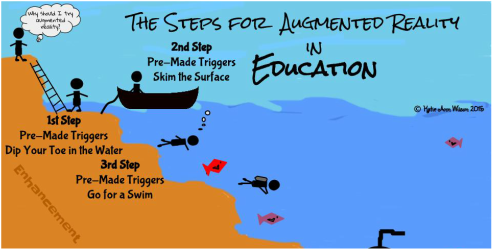
Pre-made augmented triggers can take learning deeper. We are going to go a little beyond skimming the surface with some already made augmented triggers. For step 3 of the series we will be looking into how pre-made triggers that are connected to an animated lesson, a 3D model, a video, or a 360° environment can take the learning experience to the next level.
Making an Interactive Notebook, Binder, or Journal:
I know several teachers that like for students to take notes, write in a journal, or keep a running binder of resources. Why not add an enhancement to the student's journal, notebook, or binder and reinforce a concept, topic, or enhance the learning with an augmented trigger. Someone else has already done the work of creating the augmented trigger all you have to do is match it the topic, concept, or lesson. That someone being the team of Aug That. They have tons of animated lessons from 1st grade through 8th grade on both English/Language Arts and Math, which by the way they have aligned to the common core standards. They also have massive library of 3 dimensional objects and 360° environments.
Studying space and different rockets why not put a augmented trigger of the rockets you are studying in your students' notebook. When they scan the trigger the 3 dimensional rocket pops out of their notebook where they can spin it around and zoom in on the rocket for a better look. You can't really get that experience just looking at a picture.
You have a few students having trouble with retailing a story. On their journal page adhere an augmented trigger that is tied an animated lesson that reinforces how to retail a story. A student needing a little help with developing a supporting topic, print out the already made augmented trigger and have the student attach it to his or her notes, journal, or added it to the resource binder. What if a student was gone and missed how you explained how to added and subtract decimals. Stick an augmented trigger on the assignment or, in the notebook, or send home a flashcard with the trigger on it.
Studying different historical sights such as the pyramids in Egypt. Why not have the students add an augmented trigger to their notes. When they scan it a 3D model of the pyramids pops out. Want to take them to see a volcano, summit for a mount range, or an ocean reef? Add an augmented 360° trigger to your students' writing, notes, or resources. When they scan the trigger it will transform your classroom into that environment.
Example of an Interactive Math Notebook:
I've been working on a 7th grade Interactive Math Notebook for a teacher friend. This notebook is basically a spiral notebook kids are writing notes, adding foldables, and other resources that pertain to 7th grade math. The teacher gave me the notes the kids are writing along with foldables she has created. My job was to go through Aug That's library and match up the math concept with the already created augmented triggers such as adding and subtracting decimals, fractions, and etc...
Once I found the augmented trigger that went with a certain math concept I copied and pasted the trigger image on to the foldable. If there was not a foldable just notes I then created a sheet full of that the trigger I wanted to use. The kids then cut and pasted the trigger next to their notes. Below is the link to one of the math foldables I added a pre-made augmented trigger to.
The Challenge:
You will have to contact Aug That's support team for this challenge. Ask them to show you an augmented animated lesson, 3D object and a 360° environment. Let them know what grade level and subjects you are working with. Don't forget to let them know I sent you.
Once you have tried all three different pre-made triggers I want to share your experience. You can choose how you want to share it. For example you could write a blog post, Tweet out your experience, share it with a friend, or even join my Augmented Reality for Education Group and let us know about your experience. Remember when sharing via social media use the hashtag #TechieEdu.
Using augmented triggers that are already made not only saves you time but adds enhancement to your lesson without changing the learning objective. For part two of the Why use AR series we will use two pre-made augmented triggers.
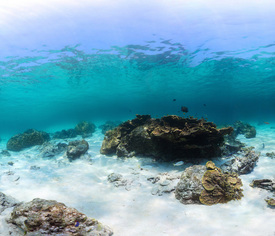
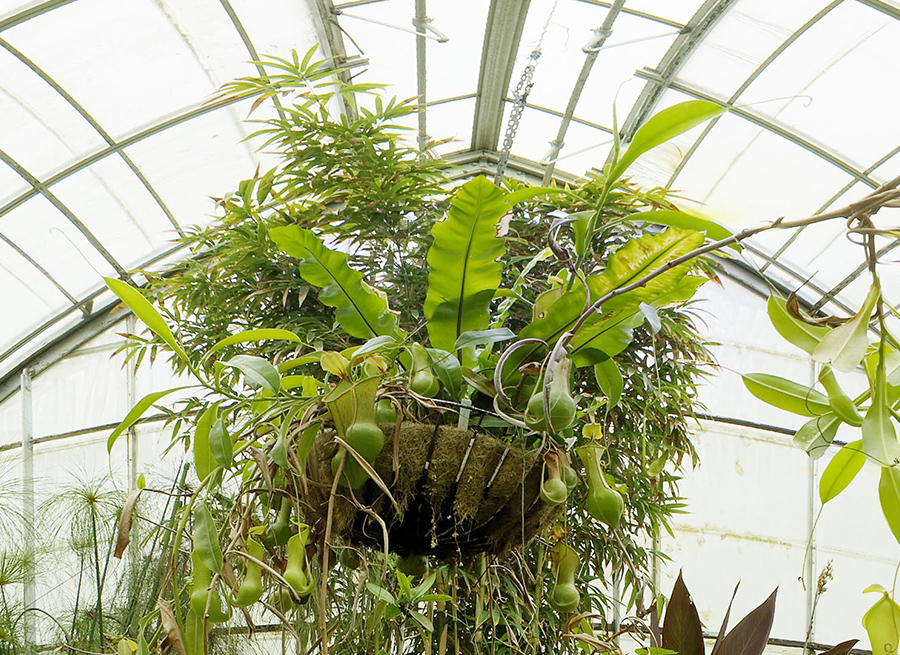
Describe the Photo
Look at the pictures below and answer the following questions:
As you are describing what is happening in the photo use where it is happen. For example - on the left, in the middle, behind and etc....
Use present conditions - What are they doing? and etc...
What is the weather like?
Is the location inside or outside?
Use adjectives to explain the mood of the setting?
How does this image make you feel?
Would you like to be there? Why or Why not?
Now take a look at the second photo and answer the same questions.
Comparing:
Looking at the two photographs what do you see that is similar and what is different. Use the following vocabulary to to describe the similarities and the differences.
Similar: all, most, both, also, as well, & too
Different: but, however, whereas, on the other hand, & although
Speculate:
Speculate the situation and use words to describe such as: use may, might, must, can't be, seems to, & appears to be.
Your Reaction:
Give your reaction to the photographs and use words such as: I'd love, hate to do that, It looks great, it appears to be dangerous, It makes me want to try, & It wouldn't suit me.
Adding AR:
You are going to ask the same questions but this time instead of just looking at the two images you are going to explore them. The app you will need is (STAR by Aug That) Supreme Tutoring Augmented Reality.
Steps to Explore:
Launch the app
Click Start Lesson
Click 360° - Panorama
Scan the 1st image with you device
Once the AR experience is loaded walk around the room.
Using your device to look up, look down, and look all around.
Describe the Experience
Explore the 360° environment and answer the following questions:
As you are describing what is happening in the around you? For example - on the left, in the middle, behind and etc....
Use present conditions - What are they doing? and etc...
What is the weather like?
Is the location inside or outside?
Use adjectives to explain the mood of the setting?
How does this image make you feel?
Would you like to be there? Why or Why not?
Now experience the 2nd image and answer the same questions.
Comparing:
Now that you experienced the two environments what do you see that is similar and what is different. Use the following vocabulary to to describe the similarities and the differences.
Similar: all, most, both, also, as well, & too
Different: but, however, whereas, on the other hand, & although
Speculate:
Speculate the situation and use words to describe such as: use may, might, must, can't be, seems to, & appears to be.
Your Reaction:
Give your reaction to the photographs and use words such as: I'd love, hate to do that, It looks great, it appears to be dangerous, It makes me want to try, & It wouldn't suit me.
Share your your experience via social media. Use the hashtags #TechieEdu and #AR4Learning.
I've been asked to help others in dipping their toes so to speak into the water and start exploring the possibilities of augmented reality (a.k.a. AR) in education. To help build the support line in learning how to incorporate augmented reality in education I am developing a series of challenges. My goal is to launch each new challenge via my podcast as well as develop an ebook to support the learning process. As each challenge is completed the participants will also be able to earn a badge.
We will start with using pre-made triggers and work our way through the challenges until you and your students are creating one of a kind augmented experiences.
ONE APP AT A TIME...
For the 1st challenge we will be dipping our toes into the AR pool and you will need makers, crayons, or colored pencils. Once you have your supplies I want you to take a look at the following picture to the right.
Questions I want you to think about:
What is the name of this character?
Where do you think this character lives?
What kind of job does this character have?
Where do you think this character is going?
Now click on the file below and print it out.
After you have printed out the picture color it. As you are coloring I want to think about a the following:
What types of characteristics does your character have?
What kind of day is your character having?
Is your character going on a journey? Late for work or school?
What does your character like to do for fun?
What is your character's favorite food, activities, colors, animals, and etc...
After you are done coloring your picture it is time to write your character's story. In your story describe where your character is and what your character is doing. Tell us what is your character like? Where your character might be going?
Take a picture of your colored image and added it to your story. I suggest using Google Docs to write your story.
Share your story via social medial using the hashtage #TechieEdu and #AR4Learning.
Augmented reality is a tool that can be used to enhance the learning experience. Using this simple augmented coloring page will help take the writing process to the next level and add a spin to your story.
The app you will need to download is Chromville. Chromville is an augmented reality company from Greenland that is bringing characters to life. Once you have the app downloaded you will scan the picture you have colored.
How to Scan:
Launch App
Tap Play
Tap Dana
Hold the iPad/Tablet over your colored image
When the red rectangle turns green you will get a message not to move.
Your augmented experience will then appear.
The augmented trigger I gave you is a labyrinth. You can interact with your character you colored and move your character through the labyrinth. Now that your character has made it through the labyrinth it is time to revise your story. For your revision you will need to add obstacles your character needs to over come.
After you have revised your story it is time to share it. Share your story using social media use the hashtag #TechieEdu and #AR4Learning.
Coloring pages from augmented reality companies can add a new depth to the learning process. They can be used to brainstorm settings, characters, events, obstacles, and etc... They can also be used to help develop the writing process as well as rewriting skills.
Tips:
I like to reveal the app that is needed after students have their rough draft completed and have colored the AR trigger.
Mix up the different AR coloring trigger pages, this keep the kids guess which app to they need to use.
Have you watched the weather report and wonder how in the heck did they get that map or video to play behind them. You and your students can create projects just like the weather man broadcasts the weather report with one simple iPad tool.
Green-Screen Project Ideas:
Teacher in-Residence - Teachers could pre-record a lesson for the substitute so that class could go on as usual. Once shared with students, they could return to the lesson again and again as needed
Historical Role-Play - Teachers could have students re-enact different historical events either using the portable green screen with props or the larger green screen with themselves.
Historical Reporting - Students could use the green screen to create a journalistic approach to report important things that have happened in the past. Click Here for more ideas.
Teaching others how to incorporate augmented reality into education is a passion of mine. I love how diverse augmented reality can be. I have also seen how engaging and powerful it can be when used as a learning tool. I don't want to just learn about the solar system, I want to hold it in my hands! I want to dig deep into it and find out how it ticks. I want to explore every corner, turn it inside out, and flip it around. Augmented reality gives me the tools to do just that.
I don't want to just read about something, I want to learn about it.
I've been asked to help others in dipping their toes so to speak into the water and start exploring the possibilities of augmented reality in education. To help build the support line in learning how to incorporate augmented reality in education I am developing a series of challenges. My goal is to launch each new challenge via my podcast as well as develop an ebook to support the learning process. As each challenge is completed the participants will also be able to earn a badge.
Augmented reality is a technology that superimposes a computer-generated image on a user's view of the real world, thus providing a composite view. Augmented reality is a tool to engage students. There are several pre-made augmented triggers that you can use or you can create special augmented triggers of your own. When lessons are engaging learning takes place.
Some AR Ideas:
Use a Augmented Color page as a writing prompt, to enhance a writing project or to teach revision skills.
Use the DOT Day color sheet and have kids design interactive LOGOS.
Elements 4D has Lessons and Printable Blocks.
History ProjectsOn the Scene Reports
Interviews with Historical Characters
Audio Clips
Interactive Maps.
The Challenge:
Use an augmented trigger in one of your lessons. It could be an AR coloring sheet from colAR, Chromville, or even Color Alive. You could even use the NASR 3D trigger, Elements 4D blocks, or even Cybercase Shape Quest.
Take pictures of your students using the AR trigger.
Post your project on the AR Project Ideas board. http://padlet.com/tigerlovessmoke/arprojects a. What was your project? b. How did you use the AR trigger? c. What AR experience did your trigger have? (video, music, 3D object, & etc...) d. Did your AR trigger have more than one AR experience? e. What was the reaction from your students?
Share your AR experience with other educators.
Tweet out your AR Project. Use the hashtag #TechieEdu
There are many tools that can help you stay organized. One tool I really like to use to organize and share resources with my students is Symbaloo. Symbaloo is an online social bookmarking tool. There is a education version and a regular version. I have been using the regular version for at least 4 years. I like that it represents a board. For my kids that is very visual and easy to use rather than just a list on a page.
Symbaloo is really easy to use. If you can copy and paste you can create tiles on a Symbaloo board. So for my second challenge I would like you to create a Symbaloo board of your choice. If you do not have an account you will need to create one. It could be a SymbalooEdu account or a regular account.
Listen to my podcast on Rembarkable Chatter and learn more about Symbaloo and how you can use it to get organized.
Below is a video clip explaining Symbaloo and how to create a board:
Once you have created your account you will create your 1st Symbaloo board. On this board you will be saving websites or resources of your choice. The boards I share with students are links to their work. For example my 8th grade computer apps classes create shareable technology flashcards. I collect these flashcards and pin (save) them to a Symbaloo board. I do this so that all of their flashcards are all in one place and everyone can have access to them. With my Symbaloo board I can embed the board directly on my website, Edmodo group, or share the link.
After have created your 1st Symbaloo board you will need to share it with me. Use the hashtag #TechieEdu and tweet out your webmix / Symbaloo Board.
I also encourage you to visit the Symbaloo Gallary. You may find a board that is already built that will fit your needs.
Some Symbaloo Board Ideas:
Guided access in a computer lab. - Make the board the computer lab's home screen.
Stored resources for a certain topic. - Save all of the video clips, web resources, Google Docs, and etc... for a topic for example Ancient Egypt on one board.
A Conference Board - Create a board and save all of the online content from a conference to it.
A Project Board - Save all the resources for a certain project to a board.
A Showcase Board - Save student work to a board and show it off during a parent night.





.png)


